
Where can you buy Starlink Mini in Australia?
You can check Mini availability directly through Starlink Australia. If buying through a retailer, confirm the exact kit, seller, delivery estimate and activation requirements before ordering. Hardware and an eligible service plan are separate parts of getting connected.
Updated for October 2026, this guide covers the buying decisions that matter for a home, caravan or campsite: service availability, a usable sky view, compatible power and a suitable mounting arrangement. Check current prices and plan terms at checkout rather than relying on an older quoted price.
Mini combines the terminal and Wi-Fi router in a compact unit. Portability can make it convenient for travel, but it does not guarantee service everywhere or make every vehicle installation suitable.
What should you check before buying?
Start with the location and intended use. Check Starlink's availability map and the service options offered for your address or travel plans. Ask whether the plan supports the way you intend to use the equipment, including any use while moving or away from the home country.
Compare the complete purchase:
- The exact Mini kit and included accessories.
- Current hardware cost, delivery estimate and service charges.
- Who handles the hardware order and any return request.
- Whether account activation is part of the direct order or requires a separate retail-kit activation.
- Any extra mount, cable or power equipment needed for your setup.
For a kit bought from a retailer or received through a transfer, follow Starlink's activation instructions. A second-hand kit needs the previous owner's transfer completed before the normal activation process can work.
Check the first billing date and pause or cancellation terms shown for your order. Do not assume billing begins only when you first plug the dish in. Starlink's billing guidance explains automatic billing and how to review the account's charges. Plan options and terms can change.
What can Mini do, and how should you power it?
Mini has an integrated Wi-Fi router and an Ethernet connection for compatible networking equipment. Its practical performance depends on sky visibility, the service plan, network conditions and the connection between your device and the router. Treat advertised speeds or Wi-Fi coverage as specifications to understand, not a promise for every campsite or building.
Use the official Mini setup guide for the supplied power arrangement, connectors and positioning. An external battery or vehicle installation needs a power accessory explicitly suitable for Mini and the intended supply; matching a plug shape is not enough.
When considering another power option, confirm:
- The accessory's supported terminal and input supply.
- The required cable and connector combination.
- Whether the intended cable length is supported.
- Protection and installation requirements for the complete setup.
Do not assume every StarPower product is a Mini DC supply, or that changing the power source automatically bypasses Wi-Fi. Power compatibility and network configuration are separate matters. Have an appropriate installer assess vehicle wiring rather than improvising a connection from a general diagram.
Weather resistance also depends on using the specified connections correctly. Follow the kit instructions for port covers and outdoor connections; do not assume an adapter makes the entire installation submersible.
How should you choose a Mini mount?
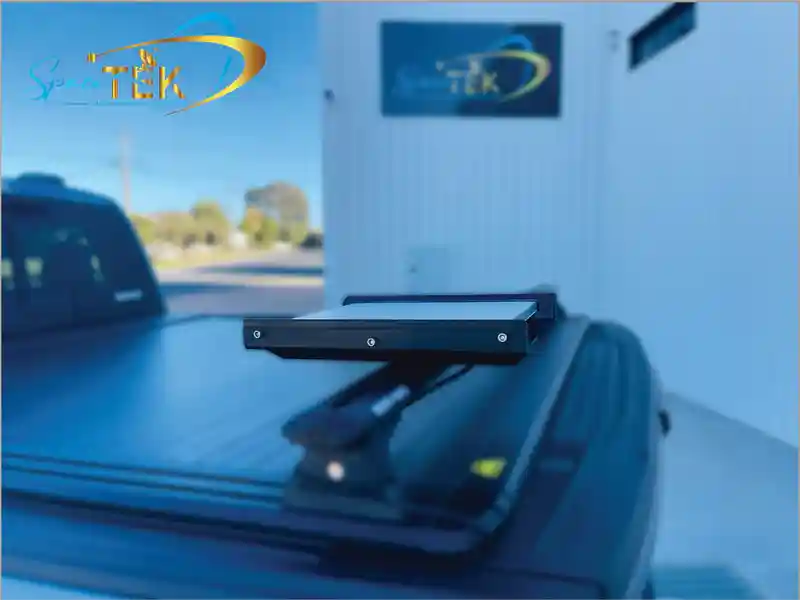
Choose the mount for the exact Mini terminal and the actual use: temporary deployment while parked, a fixed building location, or an appropriate in-motion installation. A product suitable for one application should not be assumed suitable for another.
For example, SpaceTek's Mini Basic In-Motion Mount uses a powder-coated aluminium base and machined nylon rails. The listing requires a suitable structural mounting surface and says rack-specific fixings are not included. Confirm the full installation requirements before ordering; it is not a generic instruction to bolt the mount to any vehicle panel.
For a stationary campsite setup, use the Starlink app to check the sky view before choosing the position. Keep access and cable routing practical, and follow the instructions for the particular stand or mount.
For permanent or vehicle work, review the mount's installation guide and have uncertain structural or electrical details assessed appropriately. Check connections and equipment as instructed, and avoid making unsupported modifications to the terminal or mount.
Frequently asked questions about Starlink Mini in Australia
Can Mini be used while a vehicle or boat is moving?
Only with the required hardware, installation and an eligible service plan for that use and region. Read Starlink's in-motion guidance before relying on it. A compatible mount alone does not establish service eligibility, and land travel and use on water may have different plan conditions.
Can Mini be used at home?
Check the service options offered for your location and kit. Also assess the sky view and indoor Wi-Fi needs. A compact terminal outside a building does not guarantee coverage throughout the rooms inside; test the actual arrangement before buying additional network equipment.
Can I use a battery for camping?
Use only a power arrangement confirmed compatible with Mini, its cable and your supply. Check the accessory's instructions and usable battery capacity for the intended duration. There is no single runtime or power-efficiency result that applies to every battery, inverter or DC accessory.
Can I pause service between trips?
Check the current options and charges in your Starlink account. Do not assume pausing is free or preserves the same service availability when you return. Review the conditions before committing to a travel plan.
Make the buying decision around your actual setup
Starlink Mini can be a practical compact option when the service, sky view, power and mounting arrangement suit the location. Confirm those details before spending money on accessories or relying on connectivity for a trip.
For help with a compatible mount, contact SpaceTek with the Mini model, intended use and installation context. Check service and billing questions directly with Starlink, and use the current product instructions for installation.

Leave a comment
This site is protected by hCaptcha and the hCaptcha Privacy Policy and Terms of Service apply.