
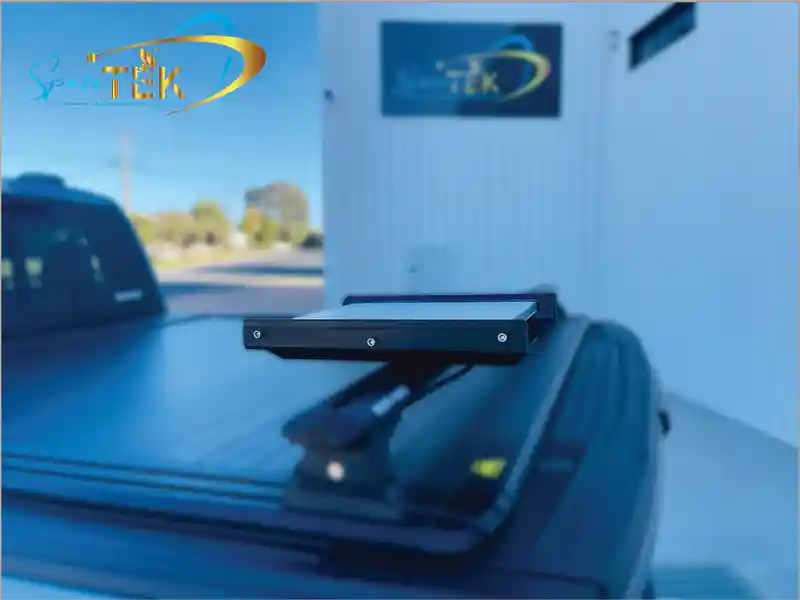
What does a Starlink Mini in-motion mount do?
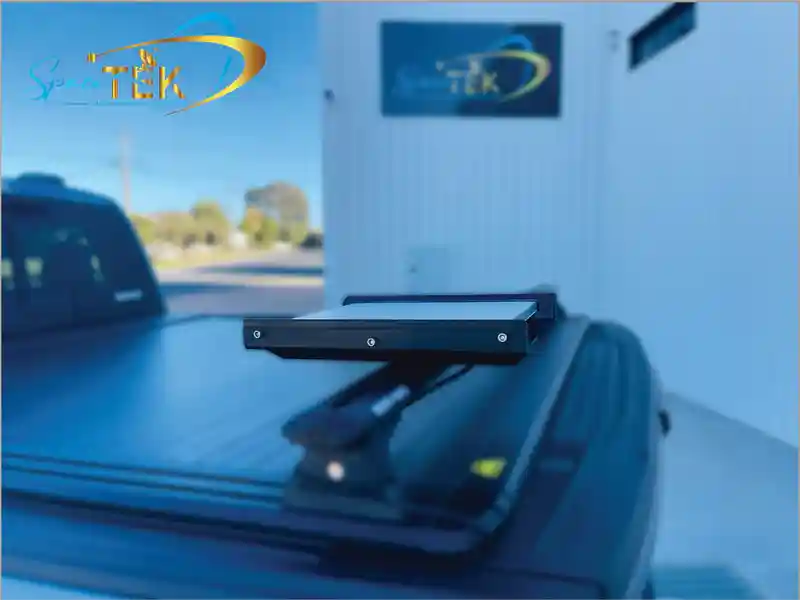
A Starlink Mini In-Motion Mount is a vehicle-mounted dish mount intended to hold a Starlink Mini securely while travelling. It can be a practical option for people who need connectivity on the road, but service availability, plan eligibility and real-world performance should always be confirmed directly with Starlink before travelling.
The useful starting point is simple: choose a mounting location with an unobstructed view of the sky, use a product designed for the vehicle and application, and follow the manufacturer’s current instructions. A secure dish mount can help keep the terminal organised during travel, but it does not guarantee uninterrupted service in every location or condition.
SpaceTek Australia’s Starlink Mini Basic In-Motion Mount is designed as a durable vehicle-mounting option for Starlink Mini owners. Before fitting any equipment, confirm the current product details and obtain professional advice where the vehicle, wiring or intended use requires it.
For mobile users, the main benefit is convenience: the terminal can remain securely positioned while the vehicle is in use, rather than being repeatedly unpacked and stored. Actual connectivity will still depend on Starlink service conditions, network availability and a clear view of the sky.
How Does a Starlink Mini In-Motion Mount Work?
A Starlink Mini In-Motion Mount is a dish mount that helps keep the terminal secured to a vehicle. It does not create the satellite connection itself: the terminal, service plan, local coverage, sky visibility and operating conditions remain important.
Before relying on any mobile setup, check Starlink’s current in-motion guidance and the instructions provided with the terminal. In-motion use can have account, regional or product-specific limits that change over time, so it is better to confirm them with the official source than rely on an old performance claim.
What Should a Vehicle-Mounted Setup Prioritise?
The priority is a stable, vehicle-appropriate mounting solution with a clear view of the sky. Keep the installation and power arrangement within the limits set by the vehicle and equipment manufacturers, and ask a qualified installer for advice if the fitment requires vehicle modifications or electrical work.
A well-considered setup also makes routine checks easier. Inspect the dish mount, fastening points and cable protection regularly, particularly after rough roads, extended travel or severe weather.
Why Consider an In-Motion Dish Mount?
A vehicle-mounted setup can reduce the need to unpack and reposition the Starlink Mini at each stop. That convenience can suit remote work, touring, field operations and travel where a portable internet setup is useful.
It is important to keep expectations realistic. Satellite performance may vary with obstructions, weather, location, network conditions and Starlink’s current service settings. Treat the mount as one part of a broader connectivity setup rather than a guarantee of continuous access.
How Do You Choose the Right Starlink Mini In-Motion Mount?
Choose a dish mount based on the vehicle, intended travel conditions and the current product documentation. A roof rack, caravan, work vehicle or marine application can have different load, clearance and corrosion considerations, so a general claim of universal fit is not reliable.
Before buying, confirm that the mount is intended for the Starlink Mini model and the planned application. Review the supplied instructions, inspect the vehicle’s mounting points and obtain qualified advice where installation affects the vehicle structure, safety systems or electrical equipment.
What Product Details Should You Confirm?
Check the current listing for the Starlink Mini Basic In-Motion Mount, including the materials, included parts, available options and suitability for the proposed use. The current listing specifies a powder-coated aluminium base and machined nylon rails. It includes the mount assembly and rail fasteners; hardware for attaching it to a particular roof rack is not included. Confirm those fixings with the rack manufacturer. The mount must use a structurally suitable surface rather than a thin or flexible panel. Read the Mini in-motion installation guide before choosing the attachment method.
Focus on practical factors:
- A mounting location that maintains a clear view of the sky.
- A dish mount suitable for the vehicle and travel environment.
- Cable routing that avoids abrasion, pinching and exposure where possible.
- Access for visual inspections and routine maintenance.
What Should Be Considered for Different Vehicles?
For 4WDs, caravans, work vehicles and boats, the right location depends on the vehicle layout and intended use. Avoid assuming that one mounting approach suits every platform.
A qualified installer can help assess mounting points, clearances and cable protection without turning a product guide into vehicle-specific installation instructions. For temporary use, only choose an option explicitly supported by the current product documentation.
Which Accessories Are Useful for a Starlink Mini In-Motion Setup?
Accessories should solve a clear travel, storage or maintenance need. Before adding an item, check that it is currently sold by SpaceTek and is suitable for the Starlink Mini model and the intended use.
How Should You Approach Power and Connectivity?
Keep power planning conservative. Use the current documentation for the Starlink equipment and any SpaceTek power product, and seek qualified assistance for vehicle electrical work. Avoid relying on generic figures or wiring advice because vehicle systems and product requirements vary.
For mobile use, protect cables from movement, abrasion and avoidable weather exposure. Check connections and cable condition regularly, especially after long drives or rough tracks.
Which Protection and Security Accessories Are Relevant?
A protective case can help store the terminal and accessories between trips. The Tough Case for Starlink Mini is a current SpaceTek option to review when durable storage is required.
For more demanding environments, review the current details for the Starlink Mini V-Cell Rugged Housing before deciding whether it suits the application. Confirm the relevant product guidance rather than assuming suitability for a particular vehicle or operating condition.
Stainless Steel Winged Bolts may be useful where the current product description confirms they suit the specific SpaceTek mount in use. Keeping accessories matched to the current product documentation is the safest way to avoid incompatible combinations.
How Can You Maintain Starlink Mini In-Motion Mount Performance?
Regular visual checks can help identify obvious issues before they become inconvenient on a trip. Inspect the dish mount, fastening points, cable protection and terminal position in line with the current manufacturer guidance.
What Matters in Challenging Environments?
Dust, salt spray, heat, vibration and rough roads can all affect external equipment over time. Keep the terminal and dish mount clean within the manufacturer’s recommendations, and look for loose components, damaged cables or new obstructions to the sky.
After severe weather or demanding travel, pause to inspect the setup rather than assuming it remains unchanged. If any component looks damaged or the installation no longer seems secure, stop using it until the issue has been assessed.
How Should You Troubleshoot Common Problems?
When a Starlink connection is inconsistent, first review the Starlink app and the official support guidance. A clear view of the sky, secure equipment and undamaged cables are sensible checks, but they do not diagnose every issue.
Do not attempt electrical or structural repairs beyond the product instructions. For persistent faults, consult Starlink support, the relevant SpaceTek product information or a qualified installer.
Where Can a Starlink Mini In-Motion Mount Be Useful?
A vehicle-mounted Starlink Mini setup may be useful for travel and work that takes place away from fixed broadband or dependable mobile coverage. Whether it is suitable depends on current Starlink availability, the account’s service conditions and the specific vehicle setup.
Can It Support Remote Travel and Community Work?
Touring vehicles and mobile teams may value a portable connectivity option for communication, planning and access to online tools. However, confirm availability and the requirements of the particular community before relying on the service.
For organisations considering connectivity for health, education, emergency response or community projects, confirm requirements directly with Starlink and relevant local stakeholders. Specialist applications can involve privacy, continuity and operational requirements beyond a dish mount.
What About Mobile Business Use?
Field teams, mobile offices, event crews and remote work travellers may find satellite connectivity useful when conventional services are limited. The practical value depends on the task, location and the current Starlink service conditions.
A secure dish mount can make equipment easier to transport and manage, but it should be assessed as one part of the broader vehicle, communications and safety plan.
Frequently Asked Questions About Starlink Mini In-Motion Mounts
Can a Starlink Mini Stay Connected While a Vehicle Is Moving?
Whether in-motion use is available depends on Starlink’s current product, plan and regional terms. Confirm the latest official Starlink guidance for the account and destination before relying on connectivity while travelling.
A dish mount can help keep the terminal secured, but it does not replace the need for suitable service eligibility, a clear view of the sky and a correctly maintained setup.
Which Vehicles Can Use a Starlink Mini In-Motion Mount?
Suitability varies by vehicle design, mounting points and the current mount documentation. Check the specific SpaceTek product listing and seek qualified advice if the proposed fitment involves vehicle modifications.
Avoid treating a generic vehicle list as a compatibility guarantee. The vehicle, roof system, travel environment and product version should be considered together.
How Should a Starlink Mini Be Powered on the Road?
Use only power arrangements supported by the current Starlink and SpaceTek documentation. If vehicle electrical work is required, use a qualified professional rather than relying on generic online wiring advice.
Keep the system’s cables protected and inspected, and confirm any accessory compatibility directly from the current product information.
Which Rugged Accessories Suit Tough Australian Conditions?
Australia’s travel conditions can expose external equipment to dust, heat, salt and vibration. The right accessory choice should be based on the current SpaceTek product information and the actual environment, not a broad claim that one item suits every trip.
A protective case can be useful for storage between uses, while a rugged housing may be worth reviewing for more exposed applications. Confirm the current product details and intended use before purchasing.
For removable components, stainless steel winged bolts can be considered when the current product information confirms they match the SpaceTek dish mount in use.
Regular checks are as important as accessory selection. Look for damage, corrosion, loose fastening points and worn cable protection, then seek qualified help where the issue affects vehicle safety or electrical equipment.
How Can You Get the Most From a Starlink Mini Setup?
A reliable mobile setup starts with realistic expectations. The dish mount can help secure the Starlink Mini, but connectivity still depends on service eligibility, a clear view of the sky, equipment condition and current Starlink guidance.
Why Does Dish Placement Matter?
Obstructions can affect satellite connectivity. Choose a location that gives the terminal the clearest practical view of the sky and remains suitable for the vehicle’s intended use. Do not alter vehicle structures or safety systems without appropriate professional advice.
How Can You Support Long-Term Reliability?
Use a dish mount that is appropriate for the Starlink Mini and the vehicle, then inspect it periodically. Pay attention to fastening points, cable condition and any wear caused by travel or weather.
Why Is Cable Protection Important?
Cables can be vulnerable to abrasion, movement and weather exposure. Keep them protected in accordance with the manufacturer’s guidance, and have damaged components assessed rather than attempting an unsupported repair.
What Should You Review Before a Trip?
Before travelling, review Starlink’s current service information, inspect the dish mount and terminal, and confirm that the equipment is appropriate for the planned route and conditions. For current product guidance, the SpaceTek Mini mount instructions are a useful starting point.
A considered setup can make Starlink Mini equipment easier to manage on the road while keeping product, vehicle and safety requirements in view.


Leave a comment
This site is protected by hCaptcha and the hCaptcha Privacy Policy and Terms of Service apply.