
How to Setup Starlink Mini: Quick-Start Overview
_compressed.webp?alt=media&token=60331bc9-ecd0-4577-adb6-b1a329e130fd "Starlink Mini Mobility Mount Removable Base with Anti-Theft Locking")
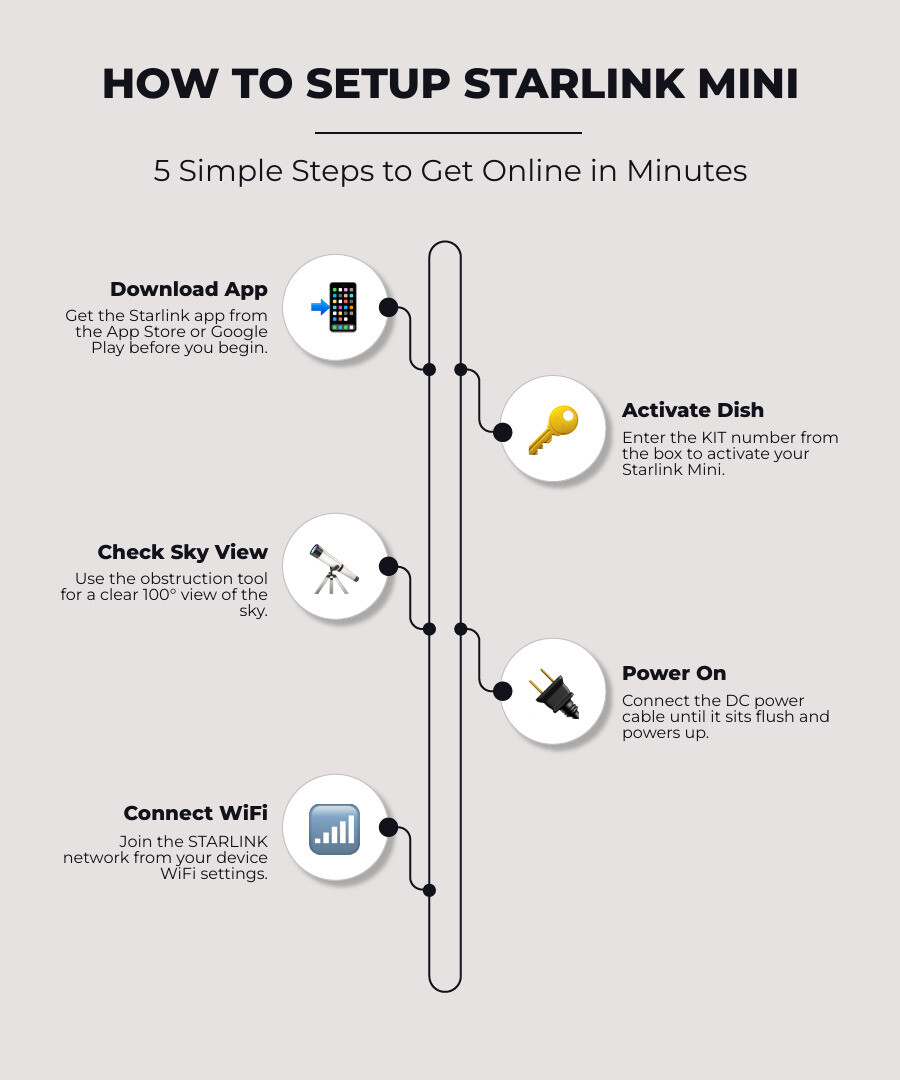
To setup Starlink Mini, follow these five steps:
- Download the Starlink app from the App Store or Google Play before you begin.
- Activate your dish using the KIT number printed on the box.
- Find a clear sky view using the app's obstruction checker — aim for a 100° unobstructed view.
- Power on the dish by plugging in the DC power cable until it sits flush.
- Connect to WiFi by joining the STARLINK network in your device's WiFi settings.
Most users are online in under 15 minutes.
The box has just landed on your doorstep. You've torn it open, and you're staring at a small white dish, a coiled cable, a power brick — and barely a page of printed instructions.
Sound familiar?
Setup Starlink Mini is genuinely one of the simpler pieces of tech you'll install. But there are a handful of things the quick-start card doesn't cover — especially if you're planning to use it off-grid, on a caravan, or out on a remote property.
The Starlink Mini is a compact, all-in-one unit. The dish and WiFi router are built into a single device roughly the size of a laptop, weighing just 1.1 kg. There's no separate router box to wrestle with.
It's designed to work anywhere it has a clear view of the sky. That makes it ideal for rural properties, touring rigs, and remote work setups across Australia.
This guide walks you through everything — from unboxing to getting online, powering it off-grid, and mounting it securely for Australian conditions.
What is the Starlink Mini Kit?
The Starlink Mini Kit is a portable, all-in-one satellite internet package designed to deliver high-speed, low-latency connectivity on the go. It integrates the satellite transceiver and the WiFi router into a single, compact chassis that measures roughly 11 by 10 inches.
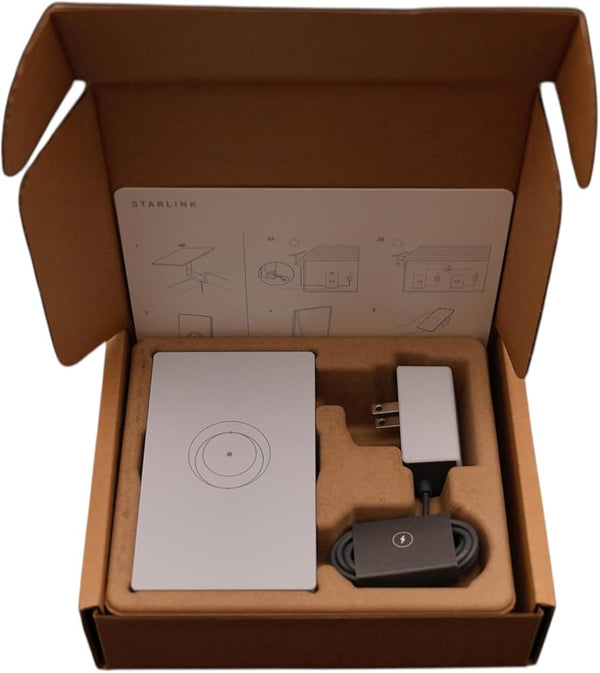
When you open your brand-new kit, you will find a carefully packed set of components designed to get you up and running quickly. The standard package includes:
- The Starlink Mini dish with its built-in WiFi 5 router
- An integrated, detachable kickstand for quick ground setup
- A basic pipe adapter for pole installations
- A flat mount adapter for basic surface attachment
- A 15-metre DC power cable
- A standard 240V AC power supply with an Australian plug
To understand how this fits into the wider ecosystem, Starlink setups are categorised strictly by dish type, each suited to specific use cases:
- Starlink Mini: The ultimate choice for ultra-portable, off-grid travel and light vehicle setups. For secure transit, pair it with high-quality SpaceTek Starlink Mini dish mounts.
- Gen 2 (Standard Actuated): Best suited for stationary residential setups or fixed caravan installations. Ensure stability with dedicated SpaceTek Gen 2 dish mounts.
- Gen 3 (Standard): Designed for high-performance residential or semi-permanent mobile setups. Secure your hardware using robust SpaceTek Gen 3 dish mounts.
- Caravan & RV: Tailored configurations for mobile travellers requiring heavy-duty, wind-resistant mounting. Explore the specialised SpaceTek Caravan & RV Starlink mounts collection.
Unlike cheap 3D-printed alternatives that degrade under the harsh Australian sun, SpaceTek components are crafted from precision-machined or folded aluminium to ensure maximum durability. For travellers looking to take their connection on the road, exploring these dedicated options is highly recommended to fill the gaps left by the factory box.
You can run your Mini on different service plans depending on your travel style. The Residential plan is locked to a single physical address, making it a great backup for rural homes. The Roam plan, however, is the ultimate choice for travellers. It allows you to use your system anywhere across Australia, supporting in-motion use so your passengers can stay connected while driving.
Step-by-Step Guide to Setup Starlink Mini
To setup Starlink Mini successfully, you must download the official Starlink app, activate your hardware subscription, locate an unobstructed view of the sky, and configure your secure wireless network. This complete process takes most users less than 15 minutes from unboxing to browsing.
Step 1: Download the Starlink App and Activate Your Dish
Before you head out of mobile range, make sure you download the Starlink app from the Apple App Store or Google Play Store.
- Open the app and log in using the credentials you created when purchasing your kit.
- If you bought your dish from a retail store, tap the activation button in the app.
- Locate the unique KIT number, which is printed on the shipping box label and on the back of the dish.
- Enter this number into the app, select your preferred service plan (such as Roam), and complete the account setup.
Step 2: Find a Clear View of the Sky
Your dish needs an unobstructed 100-degree view of the sky to communicate with the constellation of satellites moving rapidly overhead.
- Take your phone to your planned installation spot.
- Open the Starlink app and select the obstruction tool to Check for Obstructions.
- Follow the on-screen prompts to scan the sky above you.
- The app will highlight any potential Obstructions, such as trees, roof eaves, gutters, or caravan air conditioners, that could interrupt your signal.
- If Obstructions are detected, move to a clearer location or elevate your dish.
Step 3: Power On and Align the Dish
Once you have found a clear spot, it is time to connect the cables and perform the Alignment.
- Flip out the built-in kickstand on the back of the Mini.
- Plug the 15-metre DC power cable into the back of the dish, pushing it firmly until the plug sits completely flush with the surface to maintain weatherproofing.
- Plug the other end of the cable into your power source.
- The dish will power up, and a small LED light on the back will turn on.
- Unlike older models, the Mini does not rotate automatically using internal motors. Instead, it uses electronic beam steering. If the dish is misaligned, the app will send an alert and guide you through manual Alignment using an on-screen compass. Simply tilt and rotate the dish on its mount until the app confirms Alignment is perfect.
Step 4: Connect to WiFi
With the dish powered on and aligned, you can connect your devices to the Network.
- Open your phone or laptop's WiFi settings and search for the Network named STARLINK.
- Connect to the Network.
- Once connected, the Starlink app will prompt you to create a unique WiFi Network name (SSID) and a secure password.
- After saving, reconnect your devices to your newly customised Network.
For more details on optimising this initial connection, refer to the Starlink Setup Guide: Complete Installation In Under 30 Minutes (2026) | US Mobile or our detailed Starlink Mini Setup: Your Ultimate Guide to Getting Online Fast.
How to Power Your Starlink Mini Off-Grid
Powering your Starlink Mini off-grid requires a stable regulated DC input to ensure consistent, high-speed internet performance. Because the Mini has an exceptionally wide input voltage range, it is uniquely suited for direct integration into 12V vehicle systems, portable power stations, and solar setups.
%20(20)_compressed.webp?alt=media&token=c0b9de8b-b65a-4220-aa23-a1e52fe83042 "Telescopic Pole Mount Kit for Starlink - RVs, Caravans & Recreational Vehicles")
While the kit comes standard with a 240V AC power adapter, running an inverter to power your dish off-grid is highly inefficient. Converting 12V DC battery power to 240V AC, only for the Starlink power brick to convert it back to DC, wastes valuable battery capacity.
Instead, you can power the Mini directly from your DC system. This can be achieved using:
- A dedicated 12V vehicle cigarette lighter adapter designed for Starlink hardware
- A direct-wire DC-to-DC connection connected to your caravan's auxiliary battery bank
- A high-output USB-C Power Delivery source capable of outputting up to 100W
When planning your DC power setup, you must account for voltage drop, especially when extending power cables over long distances. A drop in voltage can cause the dish to reboot continuously or drop its connection under heavy load. Always use high-quality, heavy-gauge cabling and reliable connectors to ensure your system receives a steady stream of clean power.
For a comprehensive breakdown of compatible power cables, regulators, and off-grid configurations, read our Starlink Mini Power Supply Guide. Additionally, you can learn about matching your power setup with the right hardware configuration in our guide on Starlink Mini Power and Mount Compatibility: What to Know Before You Buy.
Choosing the Best Starlink Mounts for Your Vehicle or Caravan
Choosing the best Starlink mounts for your vehicle or caravan requires a system constructed from durable, weather-resilient materials like folded or precision-machined aluminium to ensure your dish remains secure during highway transit and severe coastal storms. Standard plastic options included in the factory box are rarely robust enough to handle the rugged vibrations of Australian corrugated roads or high-speed wind loads.
At SpaceTek Australia, we engineer high-quality, rust-resistant SpaceTek Starlink mounts specifically designed to endure the harshest Australian conditions. Unlike cheap 3D-printed alternatives that quickly degrade under intense UV exposure, our components are crafted from precision-machined or folded aluminium. Whether you are driving through a dust storm in the outback or parked in a coastal gale, your physical hardware must remain perfectly stable to prevent signal misalignment. A loose or vibrating dish will cause immediate dropouts and can lead to permanent physical damage.
When configuring your caravan or 4WD setup, consider these popular mounting styles:
- Magnetic Roof Mounts: These heavy-duty, rubber-coated magnetic systems secure your dish directly to your vehicle's roof or bonnet. They provide a rock-solid grip at highway speeds but allow you to quickly detach the dish and move it to a camp table when parked under tree shade.
- Pole Mounts: Ideal for caravans, these systems allow you to elevate your dish high above your awning, clearing local obstacles like roof racks, air conditioners, and low-lying scrub.
- Flat Roof Mounts: Designed for permanent roof rack or canopy installation, these low-profile, folded aluminium designs keep your dish flush against your vehicle, reducing wind drag and protecting the unit from low-hanging branches.
Do it properly the first time. Investing in a professional mounting solution saves you from costly hardware replacements down the road. To find the perfect fit for your setup, explore our SpaceTek Caravan & RV Starlink mounts collection, or read our comprehensive Starlink Mini Mount Complete Guide.
Advanced Networking: Ethernet Port and Mesh Routers
To use the physical Ethernet port on the Starlink Mini, you must carefully remove the protective rubber plug on the back of the dish and accept that using a standard RJ45 cable will void the unit's factory IP67 weather-resistance rating. This port allows you to establish reliable, high-speed wired connections or expand your local network coverage using external hardware.
The integrated RJ45 port is highly versatile, but it requires careful handling. If you plan to run a standard Ethernet cable outdoors, the connection will be vulnerable to water ingress. To maintain a weatherproof seal, you must use a specialised, waterproof Starlink Ethernet cable designed specifically for the Mini.
For those who need to extend their wireless coverage—such as sending a strong signal from a caravan roof into a nearby annex—the Mini supports advanced mesh networking. You can expand your network in two ways:
- Wired Mesh: Connect an Ethernet cable from the Mini's RJ45 port directly to the WAN port of a secondary Starlink Router Mini. This provides the most stable, high-performance connection over longer distances.
- Wireless Mesh: Place a compatible Starlink router within two rooms of your Mini, power it on, and open the Starlink app. The app will automatically detect the new node and prompt you to pair them wirelessly, a process that typically takes between one and five minutes.
For detailed, step-by-step instructions on configuring these advanced network layouts, you can download the official Router Mini Install Guide and the Mini Kit Install Guide.
Frequently Asked Questions about Starlink Mini Setup
How do I setup starlink mini for the first time?
To set up your Starlink Mini for the first time, download the official Starlink app and register your hardware using the unique KIT number. Position the dish in an outdoor area with an unobstructed view of the sky, connect the DC power cable, and join the default STARLINK wireless network. Use the app to configure a secure network name and password to complete the process.
Can I setup starlink mini on a 12V battery system?
Yes, the Starlink Mini can be powered directly from a 12V battery system because it accepts a stable regulated DC input. You can use a compatible DC power cable, a cigarette lighter adapter, or a high-output USB-C Power Delivery source. This direct connection avoids the power loss associated with running an AC inverter.
What is the in-motion speed limit for Starlink Mini?
In-motion satellite connectivity is supported on eligible mobile service plans when travelling on public roads. To use this feature safely, the dish must be securely attached to your vehicle using a robust, road-rated Starlink mount. Ensure that any power-saving standby modes are disabled in the app settings to prevent automatic disconnections while moving.
Wrapping Up Your Starlink Mini Setup
Setting up your Starlink Mini is a straightforward process that can bring high-speed, low-latency internet to the most remote corners of Australia in less than 15 minutes. By following the correct activation, alignment, and powering steps, you can ensure a reliable connection wherever your travels take you.
However, a satellite system is only as good as the infrastructure supporting it. To protect your investment from the harsh realities of the Australian climate—including intense sun, heavy rain, corrugated outback tracks, and coastal gales—robust mounting is essential.
At SpaceTek Australia, we design and manufacture premium, precision-machined or folded aluminium SpaceTek Starlink mounts that keep your hardware perfectly aligned and physically secure. Our components are engineered for durability and are never 3D printed, giving you peace of mind on your next adventure.
To find the ultimate mounting setup for your rig, explore our complete SpaceTek Australia Starlink Mini Collection and our specialised SpaceTek Caravan & RV Starlink mounts today.

Leave a comment
This site is protected by hCaptcha and the hCaptcha Privacy Policy and Terms of Service apply.