

To set up a Starlink account in Australia, go to the official Starlink website, confirm your service address, choose a plan, and activate your dish through the mobile app or a web browser. Most users move from unboxing the kit to browsing the web in under an hour, with final dish calibration settling in over the first day.
Starlink operates a dense constellation of Low Earth Orbit (LEO) satellites cruising at roughly 550 kilometres above Earth. Because the signal travels a fraction of the distance required by older satellite networks, latency drops significantly down to responsive levels around 25 ms. Speeds across regional Australia easily outpace older technologies, delivering reliable connections capable of handling multi-device 4K streaming, remote work, video calls, and farm management tech simultaneously.
The entire deployment is built around an intuitive self-install philosophy. The onboarding path gives you two convenient routes:
- Mobile App Pathway: Download the official app on iOS or Android to check your sky view, configure network settings, and monitor alignment in real time.
- Web Browser Activation: Complete the entire registration, hardware pairing, and network security setup through a standard web browser on a laptop or tablet if you are working in an area without mobile reception.
How Do You Check Availability and Create Your Starlink Account Online?
Before placing an order or unboxing any hardware, you must register your service address through the official portal. This step determines whether your local cell has open capacity and ensures you receive the correct hardware revision for your property. For properties in the bush, our Starlink internet in rural areas guide provides deeper insights on coverage nuances.
When entering your location on the map, accuracy is vital:
- Standard Street Addresses: For suburban or township blocks, typing your street address directly into the address bar will pin your location.
- Rural Properties and Lot Numbers: Rural properties often lack standard street naming. In these cases, drop a pinpoint directly onto your dwelling using satellite view or enter a Google Plus code to ensure service is assigned to your exact rooftop.
- Email Address Selection: Always use a stable, accessible webmail provider (such as Gmail or Outlook) rather than an ISP-specific email address that could be deactivated once you switch providers.
- Business Details: If you are claiming equipment or subscription expenses for a farm, station, or business, input your Australian Business Number (ABN) during checkout so GST is itemised correctly on your tax invoices.
- Regional Demand Surcharges: In certain high-density cells across Australia, a temporary one-off demand surcharge may apply to manage network load until additional satellite capacity comes online.
Step-by-Step Account Registration
- Navigate to the official Starlink website and ensure Australia is selected as your region.
- Enter your property address, rural road number, or map coordinate to confirm local cell availability.
- Select your desired service plan and proceed to the checkout screen.
- Enter your primary contact details, delivery address, and preferred payment method.
- Save your account credentials and record your order number to track hardware dispatch.
What Are the Current Starlink Plans and Hardware Options in Australia?
Choosing the right subscription tier depends on whether your setup is staying fixed to your home or travelling across the continent with you. You can review independent coverage breakdowns in the Starlink Plans Australia analysis or consult the regional connectivity resources from BIRRR.
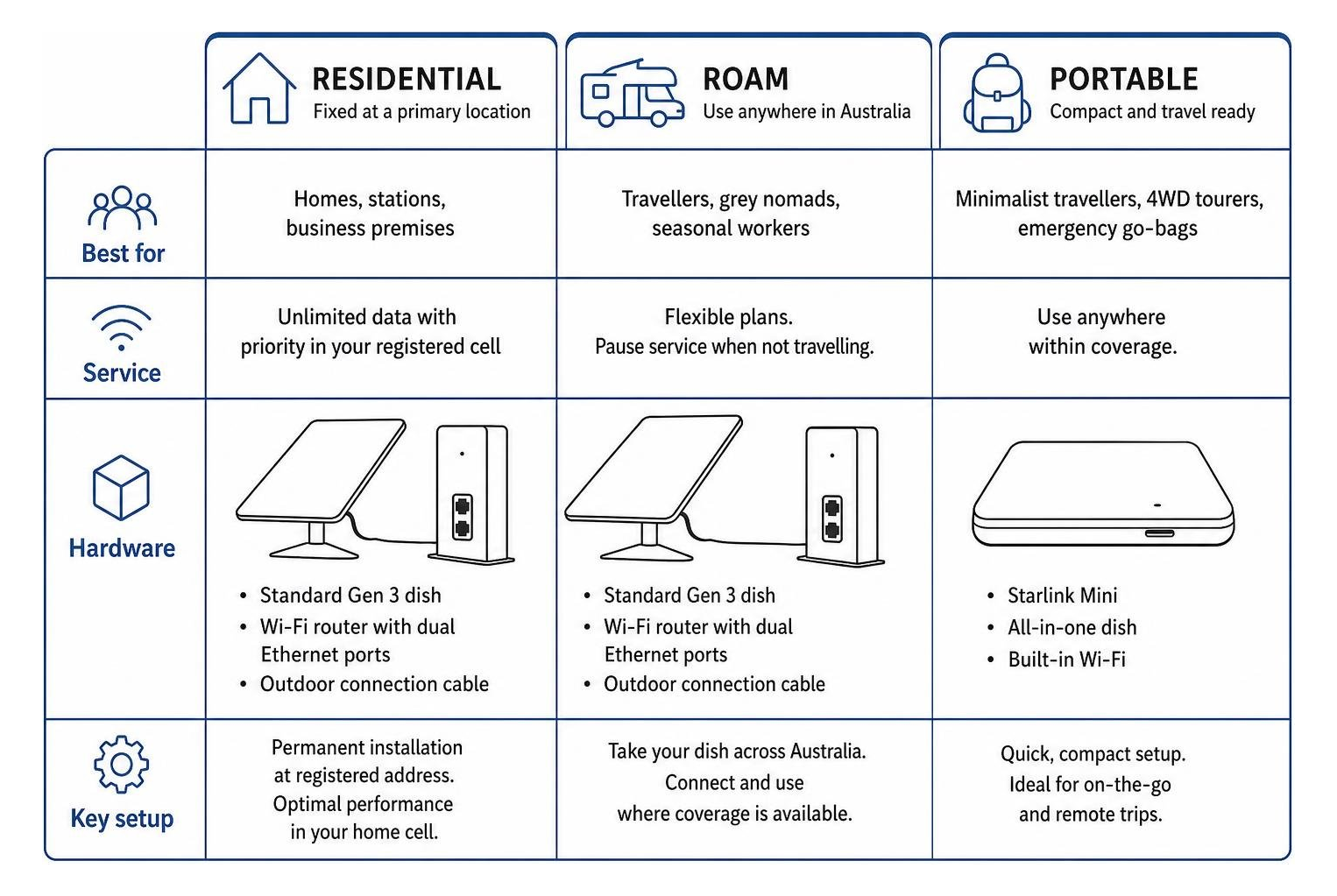
- Residential Plans: Designed for fixed installations at a primary residence, station homestead, or business premises. These plans deliver unlimited data with priority service within your registered cell.
- Roam Plans: Ideal for travellers, grey nomads, and seasonal workers. Roam packages allow you to take your dish anywhere across Australia where satellite coverage exists, featuring flexible billing options that let you pause service during off-travel periods. If you are building a touring rig, check out our specialised Starlink caravan setup walkthrough.
- Standard Gen 3 Kit: The current workhorse for residential and mobile users alike. It features an ultra-sleek, kickstand-ready flat phased-array dish, an upgraded Wi-Fi router with dual native Ethernet ports, and an intuitive alignment process.
- Starlink Mini: A compact, all-in-one portable dish with built-in Wi-Fi, designed specifically for minimalist travellers, 4WD tourers, and emergency go-bags.
Kit Hardware and Essential Accessories Checklist
- High-performance Standard dish engineered to endure extreme Australian winds
- High-efficiency Wi-Fi router featuring dual RJ45 Ethernet ports for direct LAN connections and mesh expansion
- Heavy-duty outdoor connection cable built to resist UV radiation
- Precision-machined or folded aluminium dish mounts designed specifically for Colorbond, tin, tile, or pole installations
- Weatherproof cable entry seals and protective conduit to protect outdoor cable runs against cockatoos and rodent damage
How Do You Mount and Align Your Dish for Australian Conditions?
The Australian climate is notoriously tough on outdoor electronics. Intense UV exposure, corrosive coastal sea spray, cyclic heat expansion, and outback dust storms will quickly degrade inferior hardware.

To get the highest possible speeds and prevent dropouts, your dish requires a wide, 110-degree field of view to track passing satellites without obstruction. Even a single overhanging gum tree branch or chimney corner can cause micro-interruptions during video calls or streaming sessions.
At SpaceTek Australia, we build our dish mounts from precision-machined and folded aluminium, paired with premium stainless-steel fasteners. Unlike generic plastic fittings, our Starlink mounts will never rust, sag, or degrade under harsh Australian sun. Detailed structural advice can be found in our Starlink roof mount installation guide.
Step-by-Step Dish Installation and Cable Routing
- Open the Starlink app, navigate to the obstruction tool, and scan the entire overhead sky from your proposed roof location to verify a zero-percent obstruction rating.
- Fasten your precision-machined aluminium roof mount or wall mount to a solid structural timber or metal roof batten using weather-sealed fixings.
- Seat your Starlink dish securely into the mounting sleeve until the retaining mechanism locks firmly into place.
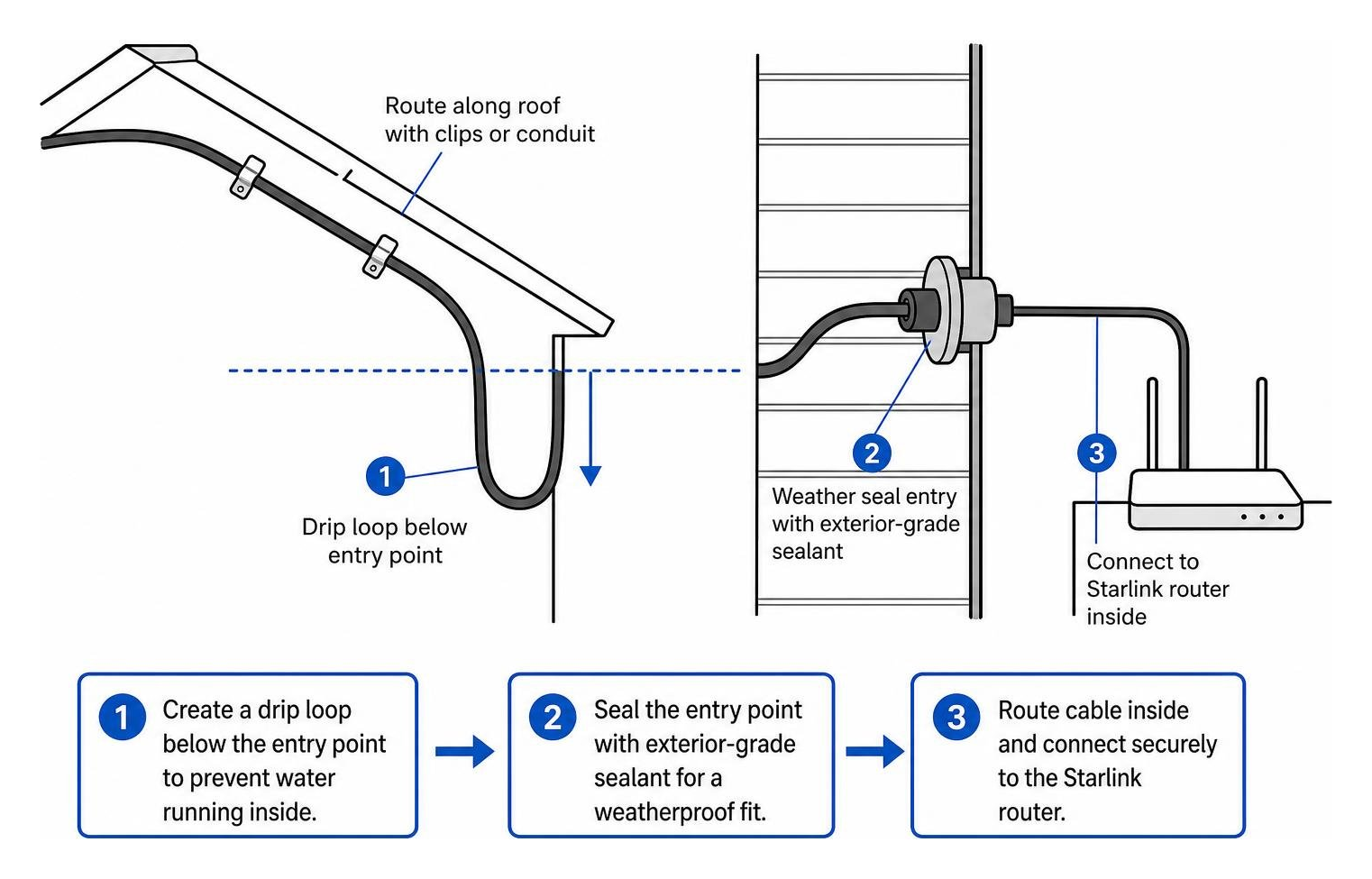
- Route the data cable along your roof line using protective conduit or UV-resistant clips, making sure to leave a drip loop right before the cable enters the building.
- Feed the cable through your wall or roof entry point, seal the penetration thoroughly with exterior-grade silicone sealant, and connect the cable end to your router.
How Do You Activate, Power, and Secure Your Starlink Wi-Fi Network?
Once your hardware is mechanically secure and plugged in, powering up the system initiates an automated satellite acquisition routine.
For off-grid homes, camper trailers, and remote work sheds running on battery banks, managing power draw is essential. Running an AC inverter around the clock to power your satellite setup wastes valuable battery capacity through unnecessary power conversions.
Utilising direct DC-to-DC power supplies, such as SpaceTek's StarPower V2 and StarPower V3, provides substantial advantages over traditional AC inverters:
- Significantly higher electrical efficiency with lower overall battery draw
- Elimination of bulky, power-hungry AC inverters from your battery bank
- Direct clean power delivery to the dish, with the flexibility to bypass the standard Starlink router for custom network hardware
- Seamless integration with 12V and 24V off-grid battery setups
If you are setting up a 12V touring system, explore our complete 12V adapter options for Starlink to streamline your mobile electrical setup.
Step-by-Step Network Activation
- Connect your router to mains power or hook up your direct DC-to-DC power supply.
- Allow several minutes for the dish to power on, search the sky, and acquire a satellite lock.
- Open the Wi-Fi settings on your phone, tablet, or laptop, and join the default open network labelled "STARLINK".
- Open the Starlink app (or type 192.168.100.1 into your browser) to enter your new custom network name (SSID) and a secure WPA2/WPA3 password.
- Reconnect your devices to your newly secured private Wi-Fi network and run an in-app speed test to confirm your live throughput.
What Are the Most Common Starlink Setup FAQs in Australia?
Can I Install Starlink Myself, or Do I Need a Professional Installer?
Starlink kits are engineered out of the box for straightforward DIY self-installation. Most property owners can complete the entire physical install using standard hand tools.
However, professional assistance is recommended if your installation involves:
- Steep, multi-storey, or fragile tile roofs where working at heights presents safety hazards
- High-wind or cyclone-rated mounting requirements in northern coastal regions
- Complex internal cable routing through multi-level cavity walls and concrete slabs
If you prefer an expert to handle the ladder work and roof penetrations, consider finding an installer in your local area to ensure your dish mount is secured safely and professionally.
How Long Does Starlink Take to Connect and Calibrate After Setup?
After initial power-up, the phased-array dish typically locates its first satellite cluster and comes online within five to fifteen minutes.
While you will have immediate internet access, allow up to 12 hours for the dish to complete its full calibration cycle. During this initial window, the system automatically downloads the latest firmware updates, maps the orbital paths of overhead satellites, and builds an obstruction map to eliminate dropped packets.
Can I Pause My Starlink Subscription When Travelling Around Australia?
Yes, provided you are on an eligible roaming tier. Starlink's Roam plans feature a flexible billing structure that lets you pause your monthly service when your caravan or camper is parked in the shed at home. When you are ready to head back out on the road, you simply unpause the subscription via the app.
Fixed Residential plans operate on continuous monthly billing tied directly to your registered service address, though you can update your service address online if you permanently relocate to a new property.
How Can You Ensure Long-Term Connectivity Across Regional Australia?
Setting up high-speed satellite internet across regional Australia has never been more accessible. By verifying your address accurately, picking the plan that fits your lifestyle, and configuring your secure Wi-Fi network, you can bring fast, reliable broadband to virtually any corner of the country.
A rock-solid connection relies on durable physical hardware. Plastic components and flimsy fittings simply will not survive outback heatwaves, severe coastal squalls, and relentless sun.
We engineer our precision-machined and folded aluminium Starlink mounts, robust DC power supplies, and rugged vehicle mounting solutions right here for Australian conditions. Equip your system with the right dish mount today, and enjoy uninterrupted, high-speed connectivity wherever your Aussie journey takes you.


Leave a comment
This site is protected by hCaptcha and the hCaptcha Privacy Policy and Terms of Service apply.